Source originale
I Tried a 24 Hour Store in China as a Black Tourist and This Happened!
Black Tourist Tries 24-Hour Unmanned Store in China
I walked into a 24-hour unmanned convenience store in China — no staff, no cashier, just me and the technology. As a Black tourist experiencing this for the first time, I wanted to see how it really works late at night. From scanning items to self-checkout, the whole process was futuristic, smooth,...
I walked into a 24-hour unmanned convenience store in China — no staff, no cashier, just me and the technology. As a Black tourist experiencing this for the first time, I wanted to see how it really works late at night. From scanning items to self-checkout, the whole process was futuristic, smooth, and honestly surprising. This video shows what it’s like to be a foreigner shopping in China’s self-service stores, and what actually happened when I tried it. Would you feel comfortable shopping in a store with no staff at all?
Step into a futuristic 24-hour unmanned convenience store in China through the eyes of a Black tourist! Experience the thrill of a completely automated shopping journey, from scanning your items to seamless self-checkout. Discover the convenience and surprising efficiency of this innovative retail concept, all captured in a unique cultural exploration.
I walked into a 24-hour unmanned convenience store in China — no staff, no cashier, just me and the technology. As a Black tourist experiencing this for the first time, I wanted to see how it really works late at night. From scanning items to self-checkout, the whole process was futuristic, smooth, and honestly surprising. This video shows what it’s like to be a foreigner shopping in China’s self-service stores, and what actually happened when I tried it. Would you feel comfortable shopping in a store with no staff at all?
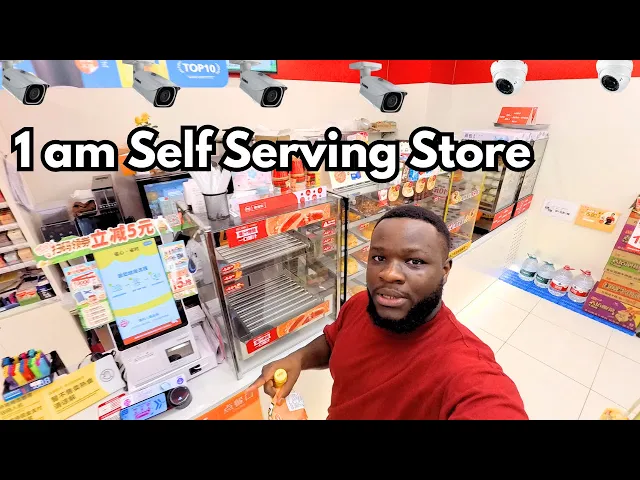
Harmony2nd stands outside a 24-hour shop at about 1 am and says no one is inside, yet he can open the door, take food and pay himself. He asks a worker how it works. The worker explains that a QR code is placed at the door: find it outside, scan it to come in, pick your items, then pay yourself at the checkout counter with a payment QR code from Alipay or WeChat, and scan again to leave. When he tries it, a mini program asks him to confirm, and a red button opens the door, but the door will not open. He asks a man nearby for help, and a passer-by says the main door does not open and to use the side door. After the man shows him what to tap, he is told he has to open the door within 9 seconds. Inside, remote customer service talks to him over a speaker and says he can take items and check out himself. He says he counts more than 10 cameras, picks chips and other snacks, confirms the quantity, taps the checkout button, opens Alipay and enters his payment password. A voice tells him to take his belongings and to scan the QR code on the door when leaving. Customer service later says resting inside for a long time is not allowed and opens the door remotely. He buys a gift for the man who helped him and ends by saying he feels trusted in the country and that this experience is why people do not want to leave China. His comments are his own impressions.
Harmony2nd visits a 24-hour unmanned convenience store in China at about 1 am. A worker explains that you find the QR code outside, scan it to enter, pick your items and pay yourself with Alipay or WeChat. At the store the door does not open at first; after help from a man passing by, he gets in through a mini program and a red button. Remote customer service speaks to him over a speaker, he counts more than 10 cameras, buys snacks, pays with Alipay, and is told not to rest inside for long. He later buys a gift for the man who helped him. These are his personal impressions of the experience.
Harmony2nd tries a 24-hour unmanned convenience store in China at night, learning to scan in, self-checkout and ask remote customer service for help.
24-Hour Unmanned Convenience Store in China: Self-Checkout at Night
0:43 Look for the QR code outside the store and scan it before you go in. The worker the creator asked said the code is placed at the door; once inside, pick your items and go to the checkout counter to pay yourself.
1:23 At self-checkout, scan the items and check out with your payment QR code. The worker said Alipay or WeChat are both fine; after paying, scan the code again at the exit, then leave and the door opens automatically.
2:19 The creator opened the store through a mini program on his phone: confirm on the screen, then tap the red button to open the door. Have your phone ready to open this kind of mini program before you try the door.
4:28 If the main door will not open, try another entrance. A man the creator met said the main door did not open and told him to use the side door, so check for a side door before assuming the store is closed.
6:12 Push the door soon after unlocking it. After scanning at the door, the creator learned he had to open it within 9 seconds, and he managed to get in once he pressed the button and pushed straight away.
6:35 If you need help, remote customer service can answer you through a speaker in the store. The creator asked whether he could buy things himself, and the voice said yes and offered to talk to him if there was a problem.
9:04 At the self-service checkout, confirm the quantity of your items and tap the checkout button below. The creator then opened Alipay and entered his payment password to finish; a voice reminded him to take his belongings.
10:54 When leaving, follow the voice prompt: take your belongings, scan the QR code on the door and click to open the store. The prompt also welcomed him to visit next time, so keep your phone handy for the way out.
11:44 Do not plan to rest inside for long. Remote customer service told the creator that resting inside for a long time is not allowed; when he asked about scanning on the way out, they opened the door for him and he just pushed it.
0:43 Look for the QR code outside the store and scan it before you go in. The worker the creator asked said the code is placed at the door; once inside, pick your items and go to the checkout counter to pay yourself.
1:23 At self-checkout, scan the items and check out with your payment QR code. The worker said Alipay or WeChat are both fine; after paying, scan the code again at the exit, then leave and the door opens automatically.
2:19 The creator opened the store through a mini program on his phone: confirm on the screen, then tap the red button to open the door. Have your phone ready to open this kind of mini program before you try the door.
4:28 If the main door will not open, try another entrance. A man the creator met said the main door did not open and told him to use the side door, so check for a side door before assuming the store is closed.
6:12 Push the door soon after unlocking it. After scanning at the door, the creator learned he had to open it within 9 seconds, and he managed to get in once he pressed the button and pushed straight away.
6:35 If you need help, remote customer service can answer you through a speaker in the store. The creator asked whether he could buy things himself, and the voice said yes and offered to talk to him if there was a problem.
9:04 At the self-service checkout, confirm the quantity of your items and tap the checkout button below. The creator then opened Alipay and entered his payment password to finish; a voice reminded him to take his belongings.
10:54 When leaving, follow the voice prompt: take your belongings, scan the QR code on the door and click to open the store. The prompt also welcomed him to visit next time, so keep your phone handy for the way out.
11:44 Do not plan to rest inside for long. Remote customer service told the creator that resting inside for a long time is not allowed; when he asked about scanning on the way out, they opened the door for him and he just pushed it.
0:01 Introducing the unmanned store
0:21 Asking a worker how to pay
1:23 Paying with Alipay or WeChat
2:08 Opening the door with a mini program
2:50 The door will not open
3:29 Asking a passer-by for help
4:28 Trying the side door
6:19 Talking to remote customer service
7:19 Choosing snacks inside
9:04 Self-checkout with Alipay
10:05 Counting the cameras
11:44 No resting inside for long
13:18 Buying a gift for the helper
14:32 Closing thoughts on trust
0:01 Introducing the unmanned store
0:21 Asking a worker how to pay
1:23 Paying with Alipay or WeChat
2:08 Opening the door with a mini program
2:50 The door will not open
3:29 Asking a passer-by for help
4:28 Trying the side door
6:19 Talking to remote customer service
7:19 Choosing snacks inside
9:04 Self-checkout with Alipay
10:05 Counting the cameras
11:44 No resting inside for long
13:18 Buying a gift for the helper
14:32 Closing thoughts on trust
black in chinaspeaking mandarinchinachinese culturespeaking chineseblack chineseunmanned store24-hour convenience storeself-checkoutAlipayWeChatmini programtravel in ChinaHow do you get into the unmanned 24-hour store?
A worker told the creator to find the QR code outside and scan it to come in. He used a mini program on his phone, confirmed, and tapped a red button to open the door.
How long do you have to open the door once it is unlocked?
The creator was told he had to open it within 9 seconds.
Which payment methods can you use for self-checkout?
A worker said Alipay or WeChat are both fine. The creator paid with Alipay and entered his payment password to complete the purchase.
What can you do if the door does not open?
The creator's door refused to open at first. A man nearby said the main door did not open and to use the side door, and remote customer service later helped him by voice.
Is anyone watching the store?
The creator spoke with a remote customer service voice and said he counted more than 10 cameras in the store.
Can you rest inside the store for a long time?
No. Remote customer service told him that resting inside for a long time is not allowed.